
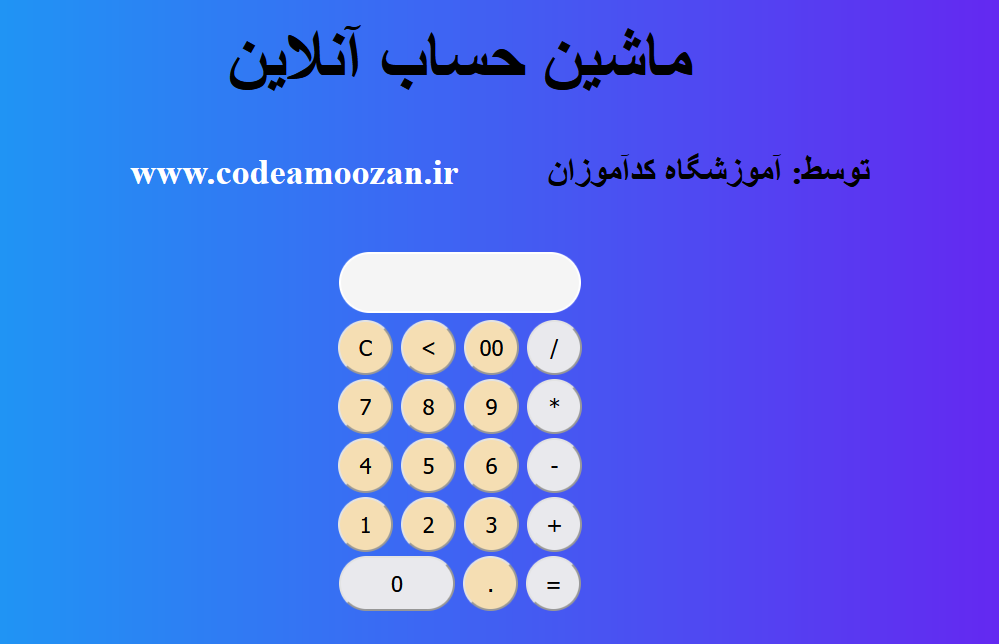
آموزش ساخت ماشین حساب با html و css
دراین آموزش فرا خواهید گرفت که چطور یک ماشین حساب ساده و جذاب را تنها با استفاده از کدهای html و css طراحی نمایید.
کد های html مربوط به ماشین حساب
در این بخش کدهای html مورد نیاز برای طراحی ماشین حساب قرار دارند.
<!DOCTYPE html>
<html lang="en">

<head>
    <title>Calculator</title>
    <link rel="stylesheet" href="style.css" />
</head>

<body>
    <div>
        <h1>ماشین حساب آنلاین</h1>
        <h2><span>www.codeamoozan.ir</span> توسط: آموزشگاه کدآموزان</h2>
    </div>

    <form name="calform" class="calform" action="index.html" method="post">
        <input type="text" name="answer" id="answer-display" />
        <br />
        <input type="button" class="num-btn" value="C" onclick="calform.answer .value=''" />
        <input type="button" class="num-btn" value="<"
            onclick="calform.answer .value=calform.answer .value.substring(0,calform.answer .value.length*1-1)" />
        <input type="button" class="num-btn" value="00" onclick="calform.answer .value+='00'" />
        <input type="button" class="oprator" value="/" onclick="calform.answer .value+='/'" />
        <br />
        <input type="button" class="num-btn" value="7" onclick="calform.answer .value+='7'" />
        <input type="button" class="num-btn" value="8" onclick="calform.answer .value+='8'" />
        <input type="button" class="num-btn" value="9" onclick="calform.answer .value+='9'" />
        <input type="button" class="oprator" value="*" onclick="calform.answer .value+='*'" />
        <br />
        <input type="button" class="num-btn" value="4" onclick="calform.answer .value+='4'" />
        <input type="button" class="num-btn" value="5" onclick="calform.answer .value+='5'" />
        <input type="button" class="num-btn" value="6" onclick="calform.answer .value+='6'" />
        <input type="button" class="oprator" value="-" onclick="calform.answer .value+='-'" />
        <br />
        <input type="button" class="num-btn" value="1" onclick="calform.answer .value+='1'" />
        <input type="button" class="num-btn" value="2" onclick="calform.answer .value+='2'" />
        <input type="button" class="num-btn" value="3" onclick="calform.answer .value+='3'" />
        <input type="button" class="oprator" value="+" onclick="calform.answer .value+='+'" />
        <br />
        <input type="button" id="zero" value="0" onclick="calform.answer .value+='0'" />
        <input type="button" class="num-btn" value="." onclick="calform.answer .value+='.'" />
        <input type="button" class="oprator" value="=" onclick="calform.answer .value=eval(calform.answer.value)" />
    </form>
</body>

</html>
کد های css برای ماشین حساب
در این بخش کدهای css مورد نیاز برای زیبا سازی و استایل دهی ماشین حساب قرار دارند.
body{
    padding: 0;
    background: none;
    background: linear-gradient(to left, #7808f0, #06bdf5 );

}
div{
    text-align: center;
    margin-top: 50px;
}
div h1{
    font-size: 72px;
}
div h2{
    font-size: 36px;
}
div h2 span{
    display: inline-block;
    color: white;
    margin: 0 80px;
}
.calform{
    width: 500px;
    padding-top: 100px;
    padding-bottom: 100px;
    position: absolute;
    top: 50%;
    left: 50%;
    transform: translate(-50%, -50%);
    transition: 0.25px;
    text-align: center;
}
#answer-display{
     background-color: whitesmoke;
     border: 2px solid white;
     border-radius: 35px;
     font-size: 22px;
     font-weight: 400;
     height: 55px;
     color: #222;
     margin-bottom: 5px;
}
.num-btn{
    width: 55px;
    height: 55px;
    border-radius: 50%;
    font-size: 22px;
    font-weight: 400;
    margin: 2px;
    background-color: wheat;
}
.oprator{
    width: 55px;
    height: 55px;
    border-radius: 50%;
    font-size: 22px;
    font-weight: 400;
    margin: 2px;
    transition: 0.25px;
    cursor: pointer;
}
.oprator:hover{
    background-color: #00d9ee;
}

#zero{
    width: 116px;
    height: 55px;
    border-radius: 32px;
    font-size: 22px;
    font-weight: 400;
    margin: 2px;
}
در فیلم زیر آموزش کامل ساخت ماشین حساب به صورت تصویری قرار داده شده است تا شما عزیزان بتوانید با خیال راحت این تمرین را بصورت کامل آموزش ببنید



دیدگاه خود را ثبت کنید
تمایل دارید در گفتگوها شرکت کنید؟در گفتگو ها شرکت کنید.