
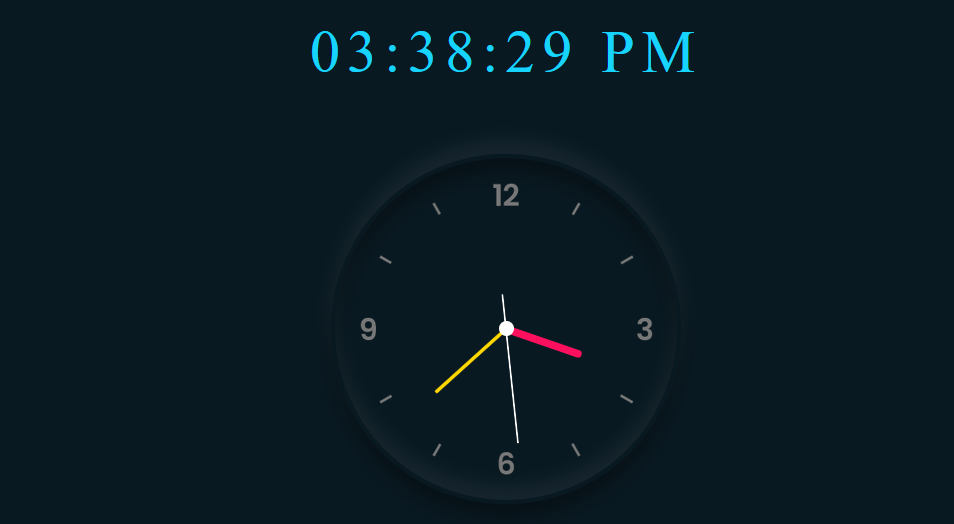
آموزش ساخت ساعت آنالوگ زیبا با html و javascript
در این آموزش با استفاده از کد نویسی با زبان html و کدهای استایل دهی با css و همچنین با کدهای پردازشی به زبان javascript
یک پروژه جذاب آماده نموده ایم. که نتیجه آن ساخت یک ساعت زیبا در مرورگ می باشد.
کدهای html و جاوا اسکریپت
کدهای زیر شامل کدهای html و جاوااسکریپت می باشند که با هم درون یک سند قرار گرفته اند.. کدهای زیر در فایلی به نام index.html ذخیره شده اند.
<!DOCTYPE html>
<html lang="en" dir="ltr">

<head>
    <title>Document</title>
    <link rel="stylesheet" href="style.css" />
</head>

<body>
    <div class="digital-clock" id="digital-clock"></div>

    <div class="analog-clock">
        <div class="hour">
            <div id="h-arrow"></div>
        </div>

        <div class="minute">
            <div id="m-arrow"></div>
        </div>

        <div class="second">
            <div id="s-arrow"></div>
        </div>
    </div>

    <!-- از خط 28 به بعد کدهای جاوااسکریپت قرار دارند-->

    <script>
        const deg = 6;
        const horArrow = document.querySelector("#h-arrow");
        const minArrow = document.querySelector("#m-arrow");
        const secArrow = document.querySelector("#s-arrow");
        const digitalClock = document.querySelector("#digital-clock");

        setInterval(() => {
            let time = new Date();
            let h = time.getHours(); // خواندن ساعت از 0 تا 23
            let m = time.getMinutes(); // خواندن دقیقه از 0 تا 59
            let s = time.getSeconds(); // خواندن ثانیه از 0 تا 59

            let hDgree = h * 30;
            let mDgree = m * deg;
            let sDgree = s * deg;

            horArrow.style.transform = `rotateZ(${hDgree + mDgree / 12
                }deg)`;
            minArrow.style.transform = `rotateZ(${mDgree}deg)`;
            secArrow.style.transform = `rotateZ(${sDgree}deg)`;
            showTime(h, m, s);
        });

        function showTime(h, m, s) {
            let midnight = "AM";
            if (h == 0) {
                h = 12;
            }
            if (h > 12) {
                h = h - 12;
                midnight = "PM";
            }

            h = h < 10 ? "0" + h : h;
            m = m < 10 ? "0" + m : m;
            s = s < 10 ? "0" + s : s;

            let timeString = h + ":" + m + ":" + s + " " + midnight;
            digitalClock.innerText = timeString;
        }
    </script>
</body>

</html>
کدهای css
کدهای زیر برای زیبا سازی و استایل دهی می باشند. کدهای زیر در فایلی به نام style.css ذخیره شده اند.
*{
    margin: 0;
    padding: 0;
    box-sizing: border-box;
}
body{
    display: flex;
    justify-content: center;
    align-items: center;
    min-height: 100vh;
    background: #091921;
}
.digital-clock{
    position: absolute;
    top: 20%;
    left: 50%;
    transform: translate(-50%, -50%);
    color: #17d4fe;
    font-size: 60px;
    letter-spacing: 7px;
}
.analog-clock{
    width: 350px;
    height: 350px;
    display: flex;
    justify-content: center;
    align-items: center;
    background: url('clock.png');
    background-size: cover;
    border: 4px solid #091921;
    border-radius: 50%;
    box-shadow: 0 -15px 15px rgba(255,255,255, 0.05),
                inset 0 -15px 15px rgba(255,255,255, 0.05),
                0 15px 15px rgba(0,0,0, 0.3),
                inset 0 15px 15px rgba(0,0,0, 0.3);

}
.analog-clock::before{
    content: '';
    position: absolute;
    width: 15px;
    height: 15px;
    background: #fff;
    border-radius: 50%;
    z-index: 20;
}
.analog-clock .hour,
.analog-clock .minute,
.analog-clock .second{
    position: absolute;
}

.analog-clock .hour,
#h-arrow{
    width: 160px;
    height: 160px;
}
.analog-clock .minute,
#m-arrow{
    width: 190px;
    height: 190px;
}
.analog-clock .second,
#s-arrow{
    width: 230px;
    height: 230px;
}
#h-arrow,
#m-arrow,
#s-arrow{
    display: flex;
    justify-content: center;
    position: absolute;
}
#h-arrow::before{
    content: '';
    position: absolute;
    width: 8px;
    height: 80px;
    background: #ff105e;
    z-index: 10;
    border-radius: 6px;
}
#m-arrow::before{
    content: '';
    position: absolute;
    width: 4px;
    height: 90px;
    background: #ffd700;
    z-index: 11;
    border-radius: 6px;
}
#s-arrow::before{
    content: '';
    position: absolute;
    width: 2px;
    height: 150px;
    background: #fff;
    z-index: 11;
    border-radius: 6px;
}
در ویدئوی زیر آموزش کامل ساخت این ساعت جذاب را مشاهده نمایید